
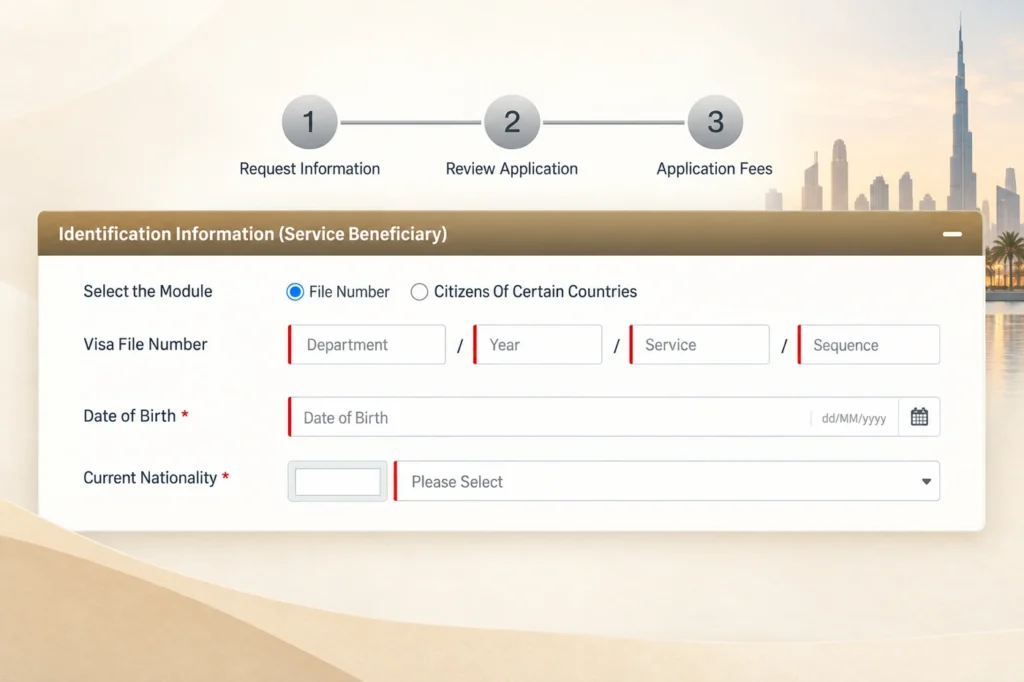
If you’ve tried to pay a visa fine online in the UAE, you may have hit a confusing step. The form asks for a Visa File Number in four boxes, but your eVisa shows an Entry Permit No. with only three parts.
They’re the same number, written in a different format. This guide explains how to split it correctly, where to pay your fine, and what to prepare before you start.
Why the numbers look different
A UAE entry permit number usually looks like this:
201 / 2026 / 11400123456
The online fines form splits that number into four boxes: Department / Year / Service / Sequence. On the eVisa, the last part combines the service code and the sequence number into one long number. To fill in the form, you just need to separate them.
How to split your entry permit number
| Form field | What it means | Example | Where to find it on your eVisa |
|---|---|---|---|
| Department | The emirate that issued the visa (e.g. 201 = Dubai) | 201 | First part of the Entry Permit No. |
| Year | The year the visa was issued | 2026 | Second part of the Entry Permit No. |
| Service | The visa type code | 114 | First 3 digits of the third part |
| Sequence | The unique file number | 00123456 | Remaining digits of the third part |
If the form rejects the sequence number with its leading zeros, try 123456 instead.
Tip: You can double-check the split using the long number printed under the barcode on your eVisa. It contains the department, service code, year and sequence number together.
Where to pay your visa fine
Where you pay depends on which emirate issued the visa:
- Pay online through ICP: use the ICP online fines payment service (Federal Authority for Identity, Citizenship, Customs & Port Security).
- Visas issued in Dubai (department 201): if ICP can’t find your file, pay through the GDRFA Dubai website or app, or at an Amer centre.
- At the airport: overstay fines can usually be paid at the immigration counter when you leave, but allow extra time for this.
- At a typing centre: if you’re not comfortable paying online, a registered typing centre can process the payment for you.
What to prepare before you start
- Passport details of the visa holder
- A copy of the eVisa or entry permit
- The entry permit number, split into the four parts
- The U.I.D. number, which is also printed on the eVisa
- Date of birth, since the form asks for it
- A debit or credit card for payment
Common mistakes to avoid
- Typing the whole third part into the “Service” box: it has to be split into service code and sequence number.
- Using the wrong portal: a Dubai visa may not show up on the ICP portal, and a visa from another emirate may not show up on GDRFA Dubai.
- Leaving out leading zeros: enter the sequence number with the zeros first. If the form rejects it, try without them.
- Waiting too long: overstay fines usually grow every day, so check and pay as soon as possible.
- Not keeping the receipt: save or screenshot the payment confirmation in case immigration asks for it.
Questions people often ask
1. Is the Entry Permit Number the same as the Visa File Number?
Yes. It’s the same number in a different format. The eVisa shows three parts, and online forms split it into four: department, year, service and sequence.
2. How do I know which emirate issued my visa?
Look at the first part of the entry permit number, which is the department code. For example, 201 means Dubai. The eVisa header also names the issuing authority, such as GDRFA Dubai.
3. Why can’t the portal find my visa file?
You may be using the wrong portal for the emirate that issued the visa, or the number may be split incorrectly. Check the department code and confirm the split using the barcode number. If the form rejects a sequence number like 00123456, try 123456.
4. Can I pay a visa fine online?
Yes. You can pay through the ICP online fines payment service. For Dubai-issued visas, you can also use the GDRFA Dubai website or app. Overstay fines can usually be paid at the airport too, but paying in advance avoids delays.
5. How much is the overstay fine in the UAE?
It depends on the visa type and on the current rules, which change from time to time. The most reliable way to find the exact amount is to check your file on the ICP or GDRFA Dubai portal, or to call Amer on 800 5111.
Disclaimer:
UAE visa rules and fees change from time to time. Always confirm the latest details with ICP, GDRFA Dubai or an authorised Amer centre before you pay.


